Ship Guidelines
This page is meant to be a comprehensive list of all that is mandatory and advised in terms of ship content when mapping or remodelling ships on Monolith.
Maintainers are free to ignore these guidelines on case by case basis for the better of the game.
Note for ship-related Pull Requests
When making a ship for monolith, you should either:
- Refer to the roster and find a ship in need of replacement
- Ask a maintainer if your ship idea fits in the game
When PRing a new ship, you must always include:
- what kind of niche it fills (in other words, consider why would anyone ever buy your ship)
- An image of the ship
- It’s radar signature (how it looks on a mass scanner).
When PRing the replacement of a ship, you must also include an image of the previous ship you’re replacing atop of the above requirements.
When PRing a tweak of an existing ship, you must also include an image of the ship BEFORE modifications. This applies for radar signature too, if changed at all in major ways (through markings)
To render ship images use the following command:
Keep in mind that:
- It can be used for multiple ships
- It only works for ships in the Resources folder
- Saved ships are located in:
Repeated failure to follow or refer to guidelines makes one’s PR liable to be closed.
Recommendations
Do not start your mapping journey with a large vessel/important POI! It will only waste you and maintainer’s time, embark on large projects at your own risk - Make sure you have a solid understanding of mapping requirements and methods! It is not maintainer responsibility to fix your PR!
Before beginning to actually map a ship, make sure you already have an understanding of what you wish to make, and whether it is something that players want or will use. If there are five different cargo ships, don’t make another cargo ship, unless you’re trying to replace an existing one! (Look in the Ship Roster section for pre-existing ships!)
Once all of that is done, feel free to take a look at current in game ships for inspiration and mapping techniques !
General Guidelines
When mapping a ship, the most important part is keeping it consistent. Whatever you do make sure it stays consistent accross all the ship for the player’s immersion. It is heavily recommended to consult a maintainer on whether your ship idea will be accepted, or periodically during the process of creating it. Making a ship flawed at its core will waste both your time remaking it and our time reviewing it.
Appearance
- General shape
- Avoid simple geometric shapes, especially just squares & rectangles
- If you are unsure of what shape to go with, try drawing one you like with just plating and then filling it in with walls (keep in mind space dedicated for thrusters & ship guns !)
- You can use angled version of plating & lattice. Do not overdo it, and make sure to stay coherent (all plating should feel connected)
- Radar signature
- This comes after the general shape in prority, but should still be visually pleaasing.
- (Optional) Radar markings
- Radar markings should be placed tactically. Drawing out engine compartments, dividing rooms and the such
- You are free to experiment to make the signature pleasing. Do not over do it. Simple & efficient markings are HEAVILY encouraged
- Ships should look good, both on the outside and in the inside
- This can be achieved with decals, good hull profiling, greeble, among other things.
- If you make a ship (especially as a replacement for an existing vessel), it must look better and fit the setting. (Put effort in with making decals! Good decals define a stellar vessel and make a bad one good!)
- Vessels should follow design standards for whatever (minor) faction they belong to!
- For TSF & PDV, redirect yourself to the faction ship guidelines
- Mercenary vessels are not as limited in style, but whatever theme you choose for your vessel, it should remain consistent across the hull and be coherent - it should still look good!
- Remember to put tiling underneath your doors
- Keep all floors under walls as plating (not lattice), which can be done instantly by running the command below
Identification, Cost, and other Yaml changes
- Ship naming nomenclature: (Author) (Name) (Type)-{1}
- Author: Only usually seen on shipyard consoles, it has its own field in yaml. Put in whatever combination of three or four letters in, keep this consistent across ships you make! It is used to identify who made what ships (e.g Onezero0 uses SHM, John mcMapper uses JCM, etc. Don’t use the same ID as someone else!)
- Name: Up to contributor discretion. Make it fitting, unique, and appropriate.
- Type: CIV (Civilian/medical vessels), MIL (well-armed specific combat ships accessible to mercs), TSF (TSF-exclusive vessels), EXP (Expeditionary vessels, general Merc ships), PDV (Dynasty-exclusive vessels)
- {1} is the space where an identification code for a ship is put in the name, keep this at the end
- Cost
- Use the appraisegrid command (make sure that the map is initialised & you, the aghost are OFF the grid)
- Give it a 20% mark up at minimum, more for combat ships (take a rounded value of the appraisegrid, and multiply by 1.2. example: 57894 appraisgrid value, round to 57900, multiply by 1.2)
- Feel free to leave it at 20%, a maintainer will help you get a proper markup value.
Functionality
- FTL drives are recommended for most ships, though be judicial in your use of more advanced variants (such as CTLA-25s, CTLA-50, etc)
- Shields are in an interesting place - keep their effects in mind, and if you have one, make sure it has enough power! Power supply = shield durability, and they are mostly limited by APC capacity. Be careful, high-end shields may need 2 APCs.
Fundamental Requirements
The list below is a checklist of hard requirements. Only scrapyard ships and non player controlled ships are exempt.
Communications/Control
- Holopad (using the [ship] prefix)
- Fax machine (same prefix usage as above)
- Station Records computer
- Shuttle console
Engineering
- Power source, (choose one below) note of their votality and use them as a weakpoint.
- Fueled generators: Jr PACMAN, PACMAN etc.. (using the [ship] prefix, multiple of the same kind is allowed.)
- Solar panels (any kind of glass is accepted, can be paired with other power sources)
- AMEs
- Jr.DK, DK, Z-pinch
- NO singularity/tesla
Only do this if you can handle modifying a yml map file. You can change the targetted power output by adding the targetPower parametere like in the example below
- Wall fuel locker/rack with fuel for your power source of choice
- Power storage
- SMES/Advanced SMES (Advanced allowed on a case by case basis, make sure it’s consistent with the ship’s style.)
- At least one substation, consider multiple for large ships
- APCs for each room, small ships may deviate from that rule (multiple for powering shields if applicable)
- Functional power networking, avoid wiring under walls, exceptions are:
- Wiring wallmounted APC/Substation
- Wiring external ship components (thrusters namely)
Atmospherics
- Running the command below to instantly fill the inside of the ship with the regular air mix
- Piping
- Avoid piping under walls (exception is linking the waste passive vent to the outside of the ship)
- Make use of the Atmos piping layer system (You can screwdrive scrubbers & vents to change their layer, select the pipe through the spawn menu to trigger layered placement)
- Piping networks should connect all rooms of the ship. (exceptions are small one tile rooms for things like FTL, gyros etc.. & maints if you have any are exempt from this rule)
- You can alternatively use two passive vents to connect a smaller room with a larger one
- Nitrogen & Oxygen canisters, they:
- should be accessible by the players for tank refilling
- need to be anchored on connector ports into a gas mixer (21% oxygen, 79% Nitrogen, 101.3 kPa)
- Distro pipe network
- Should be connected to the gas mixer
- air vents should be connected to it
- Waste pipe network
- Should be connected to an exterior passive vent to vent all the waste gas (you can and should place it under thrusters if you have nowhere to)
- air scrubbers should be connected to it
- Fire & air alarm network
- (glass) Firelocks should be put under doors and linked to the two air alarms of the rooms they are connecting
- same ruling for directionnal firelocks, except they are put against doors
- All rooms with air vents & scrubbers should have an air alarm which they are connected to.
- (Optional) fire alarms (connected to all the firelocks in the room)
- Linking can be done manually with a multitool (MAKE SURE TO DESTROY SAID MULTITOOL OR CLEAR IT’S NETWORK BEFORE SAVING THE GRID (it will make invalid popup in the ship.yml file))
- Colored pipe networks (done with the command below)
- #990000 for waste
- #0055CC for distro
colornetwork [Pipe ID (you can see it by right clicking the pipe)] Pipe [color hex code (ex: #99000)]
The command automatically colors the entire connected pipe network, try to use it when you’re finished laying it down.
Internal ship components
- Mini gravity generator
- Gyroscope(s) (The more are put down, the faster the ship can turn)
- Make sure to reflect how heavy you want your hull to be. A capital should feel somewhat clunky to turn.
- Fire Extinguisher cabinet (Filled)
- Internals cabinet/Suit storage (Filled)
- Defibrillator cabinet (Filled)
- Generally, non-exterior tiles should be proper interior tiles and not plating, including under airlocks.
- If the ship’s components present any hazard such as radiation, the ship must provide corresponding protective gear and, if applicable, shielding.
External ship components
- Exterior walls should be Reinforced Steel walls and above.
- External airlocks & docking ports
- Exterior doors should either be docks or “external” airlocks
- Directional fans under all external airlocks
- Airlock intermediate space (Airlock doors should bolt each other when the opposite door is open!)
- Reinforced hull plating under ship guns & thrusters (necessary so they aren’t shot off easily)
- Decal or catwalk on top for aesthetics
Thrusters guidelines
-
Follow the below example when placing walls under plating. For what is allowed, allowed on a case by case basis & forbidden
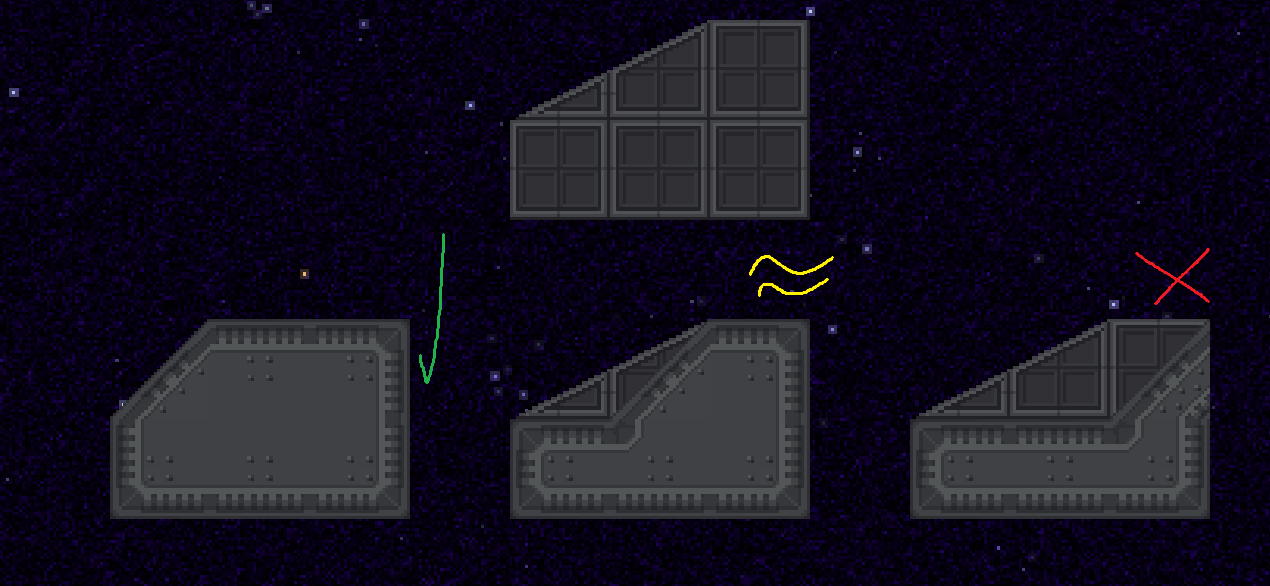
-
Thrusters in all four directions
- When placing them, make them look like they are part of the hull, not hanging out. See non-exhaustive example below
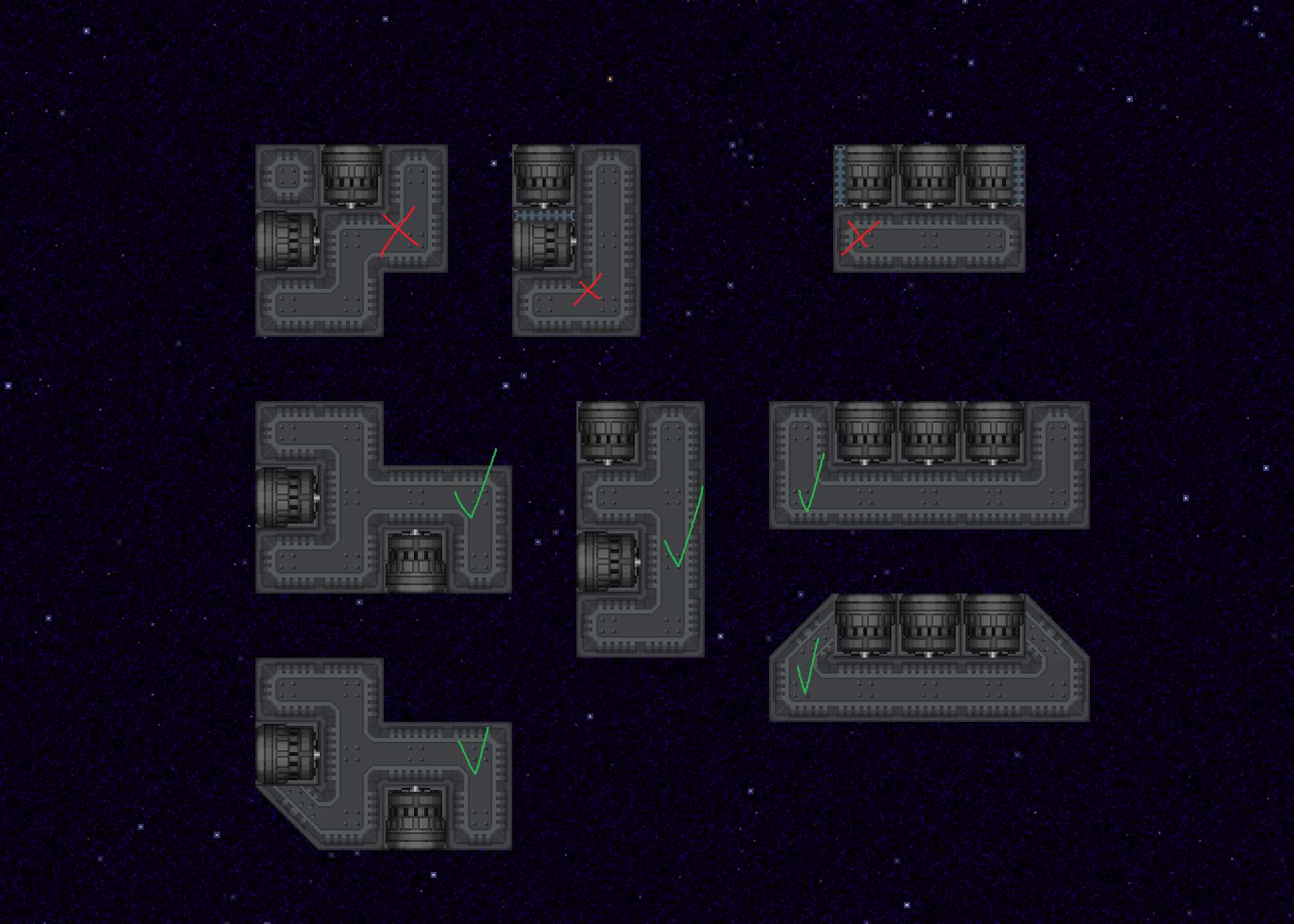
- Unless the ship has a gimmick in mind (like strafing or omnidirectionnal), you should focus on main thrust.
- You can protect thrusters with grilles
- Keep the exhaust zone of thrusters except for the above scenario.
- 3 tiles of free space for regular thrusters & 7 for large thrusters.
- When placing them, make them look like they are part of the hull, not hanging out. See non-exhaustive example below
-
(optional) Large thrusters (keep in mind their large power draw!)
- Small ships: Only allowed for main thrust
- Medium & below: Only allowed for opposing directions. I.E left/right or front/back. (See the RSC Scallywag, it’s a great example of that rule.)
- Large & above: All directions allowed
-
Integrate your thrusters properly into the hull ! Follow the below example for what is allowed, allowed on a case by case basis & forbidden
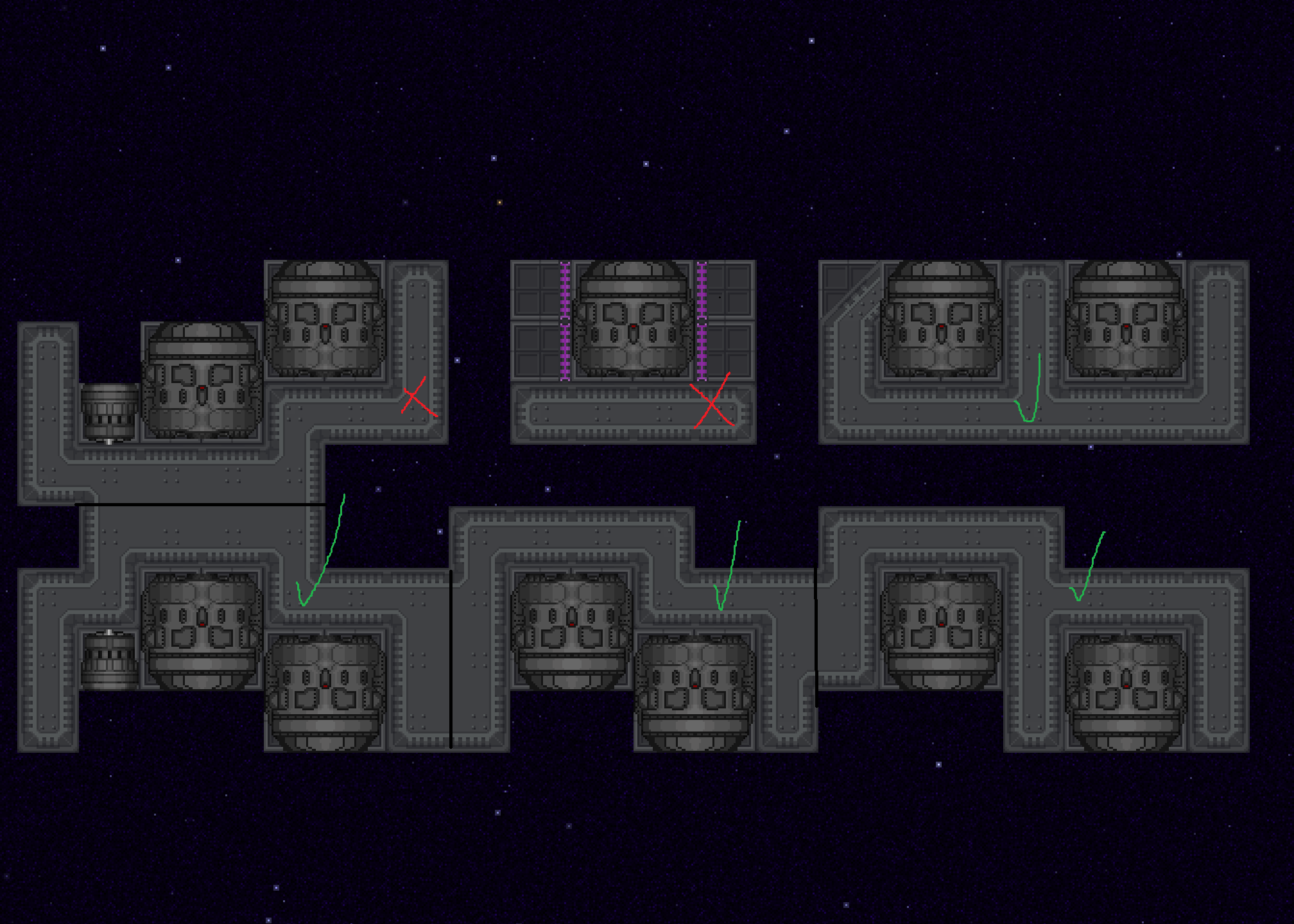
-
APPLICABLE FOR SMALL/MICRO SHIPS ONLY Small ships and below have relaxed thruster guidelines to allow for more interesting shapes. See non exhaustive example below
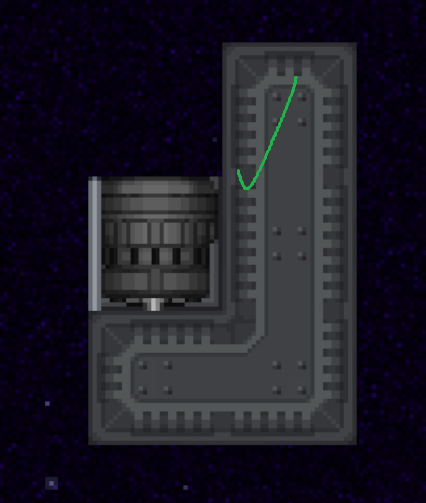
Meta
- Warp Point (for ghost spectator reasons)
- Latejoin spawn point - Keep in a crew/habitable area!
- Add the Roof component on your grid
- To do so, execute the command “vv [gridID]” and in the “Server Components” tab press the Add Component button
- Add the roof enabled/disabled markers to all tiles you want to not be affected by planet lighting (such as exped planets).
- No Roof markers on external areas (for expedition lighting namely)
- Vacuum markers on enclosed spaces that are meant to be spaced (like atmos burn chambers & fully spaced ships)
Combat guidelines
These guidelines apply to all vessels. Combat requirements from other guidelines overule parts of these guidelines (such as carriers having lower power gunnery servers)
Mandatory for ships with ship mounts
- Gunnery console, same orientation as Shuttle Console
- Gunnery server (see following section for more details)
Military supplies
- Do Not Over-supply ships - keep personnel armament to a minimum, and at most provide basic equipment - players can kit out their ships themselves!
- An example is a beanbag kammerer, or a MK-58.
Non faction military ships
- Dedicated combat ships should be filling a unique niche in combat
- Combat ships should also have some kind of “economy” purpose for downtime
- cargo bays, small R&D, chemistry, anything so long as it does not outvalue a vessel dedicated to such economy.
Gunnery server ruling
- Gunnery server (power of the server depending on ship size)
- Small: low
- Medium: medium & below
- Large: high & below
- Capital: ultra high & below by default. Liable to exceptions on a case by case basis (discuss with maintainers).
Ship mounts
- All shuttles should have some kind of armaments (exception applies for (minor) factions hulls).
- A couple L-85s to act as point defense is fine for regular CIV ships.
- Keep the armament consistant. Non exhaustive examples below:
- High tech ships use laser mounts, light and directionnal armor, shields
- Low tech ships use ballistic mounts, and heavy armor
- EMP gun mounts
- should be used to fill specific niche (like a boarding vessel, interceptor police craft etc..)
Armor & shields
In monolith, armor & shields are what define how long your ship can sustain damage before it’s insides can be punched through.
CIV ships
- Reinforced steel walls should be the privileged kind of armor
- Extras (pick one, keep in mind the addition of these when calculating the price !)
- Directional plastitanium shielding
- Energy shield (MS-100 only)
MIL ships
-
MIL ships are granted a single layer of plastitanium walls.
-
External components (ship guns, thrusters, airlocks..) should be surrounded with plastitanium walls
-
For extra armor, you may add additionnal layers of reinforced steel walls
-
Extras (pick one)
- Directional plastitanium armor (to cover weakpoints and possibly thruster blocks!)
- Energy shield (MS-100 only)
Scrapyard Guidelines
Scrapyard ships are ships that are “flying shit boxes” in spirit. This means that a ship not meeting guidelines, only to brand it as scrapyard later for it to pass review will get it merged. Scrapyard ships should be pretty shit boxes.
In addition to normal guidelines:
- Scrapyard ships can ignore QoL-related mapping guidelines (you can omit atmos, defib, etc).
- Having design flaws is encouraged.
- The ship should still be usable for some purpose, or be easily retrofittable for that. It should be something people would have reason to buy at least rarely, or to have fun with.
- Ships should not require any extra repairs or gear to be safely usable, or come with any required gear, like a radsuit if the ship is entirely irradiated. EVA suits or hazards contained to specific rooms are exempt.
- Ships should be scrappy in at least a somewhat realistic way. Your ship should look like something someone actually built, even if it was built out of scrap and long enough ago for it to have rusted.
- Ships should still fit visual standards and look fitting for the server. Leeway is allowed, but not too much.
- Ships can, and are encouraged to, have experimental nonstandard features (example: disposal chute item cannon).
Carrier Guidelines
Carriers
- Gunnery server (power of the server depending on ship size)
- Medium: low
- Large: medium & below
- Capital: high & below by default. Liable to exceptions on a case by case basis (discuss with maintainers).
- Armaments should have a defensive focus (point defense, long range weaponry)
- Multiple docks for drones & fighters
Fighters
This refers to smaller shuttles meant to be manned by player controlled crew bought on carriers.
- Thruster guidelines are relaxed to amount for the small space
- Size Micro/Small only
- Low power gunnery server ONLY
AI fighter drones
- Thruster guidelines are relaxed to amount for the small space
- Low power gunnery server ONLY
- No life support
- No gravity
- No IFF console
- APU/RTG power only
ADS guidelines
ADS ships are as of 14th of March 2026 in a nebulous state in monolith. Ask a maint before starting to map one ! Mandatory
- No gravity
- No life support
- AI core
- Borg spawnpoint
- External access (no dock, only external !
- No IFF console
Suggestions for External Access: Use an airlock armored up by a blast door, potentially multiple airlocks. Use buttons to control the blast door from the inside.
Armaments
- Curio weapon set
- Heavy armor (plastitanium/nanolaminate)
Size & niches
Size
- Small: Small, up to discretion - but usually ~10x20 tiles large.
- Medium: Medium, up to discretion - usually 20x40 tiles large.
- Large: Large vessel, up to discretion - usually ~30x60 tiles large
- Capital: Massive vessel, up to discretion - think Halcyon/Jupiter/Flyssa
- Station: Station sized. Only for POIs. Up to discretion.
Economy Niche
- Medical: Has equipment for medical activities, including surgery
- Chemistry: Has equipment for chemistry
- Service: Generic term. Usually for civic service, including cooking and botany.
- Research: Research vessel, capable of xenoarchaeology and has production equipment. May also have anomaly research functionality if large enough.
- Engineering: Production vessel, particularly for repairs and other miscellanous economy strategies.
- Atmos: Atmospherics vessel, with gas extraction and (if large enough) gas processing equipment.
- Cargo: Vessel with plenty of storage space, for player use.
Miscellaneous
- Wild: Wildcard. Put whatever you want here, as long as it follows other included restrictions.
- Multipurpose: Vessel may include multiple economic niches.
Economy Functionality Requirements
These are general requirments for ship designation. Feel free to lightly deviate from them if you think this serves the spirit of the ship. (doing so doesn’t guarantee approval)
Cargo:
- Large empty cargo bay(s) with easy access to docks (Optional: With conveyor belts)
- 5 wide dock with flaps (See standard cargo dock, look at other cargo ships/trade docks)
- Autolathe (optional)
Salvage:
- Ore processor (for a faction mining ship, this can be industrial)
- Cargo/EVA bay to space (blast doors or external airlock)
- Filled salvage specialist locker
- Salvage suit storage (salv hardsuit, salv EVA, mining hardsuit)
- Ore box/Construction box (optional)
- Salvage techfab (optional)
Medical:
- Medical bed
- Stasis bed
- Recharger (for defibrillator)
- Filled medicine cabinet
- Surgery supplies (medium and above)
- Freezer (walk in or container, medium and above)
- Crew monitoring console
- Crew monitoring server (medium and above)
- Medical techfab
- Bank ATM (Withdraw, normal kind for large enough vessels)
Advanced medical:
- Biofabricator
- Cloning pod
- Medical scanner
- Cloning computer
- Biomass recycler, in a morgue
- Morgue with a drain
- Cryopod setup (Guidebook layout works, make sure whatever you use works!)
Chemistry:
- Sink (one with water)
- Drain
- Filled chemistry locker
- Hotplate
- Electrolysis machine
- Centrifuge
- Reagent grinder
- Chemical dispenser (filled)
- Chemmaster
Xenoarch (Science)
- Analysis console
- Analysis pad
- Dedicated artifact chamber, with a directional fan dividing it from main atmos - should have a blast door to space toggleable from outside
- R&D server (Ideally far from arti chamber)
- R&D console
- RD suit storage
- RD locker
- Autolathe
- Protolathe
- Circuit imprinter
- Arti chamber is permitted to use plastitanium walls/windows, even if it is a civilian vessel
Kitchen:
- Electric range
- Freezer (any kind)
- Reagent grinder
- Electric grill
- Deep fryer
- Microwave
- Food-o-mat
- Drain
- Chef closet
- Chefvend
- Plasteel Chef vender
- If you have a walk in freezer, put a meat spike in it (and a freezer container)